
Frequently asked questions
Hi, just bought the slim safe solar security light, where exactly is the button to switch between modes please?
Asked by Colin Bermingham on 7 Jan 2026
Hello, I believe with the new versions it is a fingerprint button at the front of the light.
How long does the light stay on for between activations
Asked by Stephen on 25 Nov 2024
30 seconds
Hi just installed a Slimsafe solar security light, went out at night after installing and charging, light was already lit but not bright, approached light and it lit up brightly, left the area and after a time the bright light changed to a less bright light. Is this OK as the light did not turnoff and stayed on the rest of the time I observed for over an hour, is this correct or do I have a problem.
Asked by Mick on 15 Jun 2024
mode 1: 100% brightness for 5 hours or until the battery runs out mode 2: 50% brightness switches to 100% when motions detected mode 3: 100% brightness for 30 when motions detected, turns off after. In order to switch between them, press the touch button locatating at the front of the unit.
What size battery does it have
Asked by Andrew on 4 Feb 2024
It's an 18650 battery, however it is non-replaceable.
Hi, Please could you advise what are the dimensions of both small and large lights and how are they fixed in position. Regards Ann Blackmore
Asked by Ann Blackmore on 26 Jan 2024
Hello, Slimsafe pro solar security light Length 220mm Width 200mm Depth 30mm Slimsafe solar security light Length 170mm Width 200mm Depth 30mm You can install your lights using the bracket that is provided.
Hi, Can I install this light vertically on a wall? Do you know how this would affect the sensor? The reason for this is that i want the light facing north and the sensor south
Asked by Greg on 26 Oct 2023
Hi Greg, The sensor is inside a light and it is a microwave one so it will turn of based on heat not movement.
Is the battery replaceable or rechargeable?
Asked by Margaret on 19 Oct 2023
Hello, all our batteries are rechargable with the slim safe the battereis ar enot replaceable
Hi,I've let my light charge,switched off since it was delivered. I installed it today,south facing but when I tested that it functions tonight,the light output is very dim. Will this improve? I will switch it off and leave it a few days and keep my fingers crossed!
Asked by John on 19 Oct 2023
Hi John, Yes, it is always best to leave the light to charge from 3 to 5 days before tunrning it on so it gathers a booster charge into the battery.
How do you set the motion sensor? My light just stays on permanently!
Asked by Lyn on 17 Oct 2023
Hi, You cannot adjust the motion sensor settings, the Slimsafe lights have a microwave sensor, as opposed to PIR, which means they pick up a wider variety of movement.
I've installed this light at approx 9 ft high in the back garden but unfortunately as my property is on the corner it is continually being activated by cars driving by. It is literally only off for 15 seconds before being activated again. What is the motion detection angle? Is the detector in the solar panel or the light unit? Do I need to bring the height down so the unit is below the side wall to avoid this?
Asked by Gavin on 15 Oct 2023
Hi Gavin, the PIT would be in the light not the panel, it would be worth a try to lower the light down
does this (or the smaller version) have a manual override by-passing the PIR sensor so it remains on constantly ?
Asked by Bert on 13 Oct 2023
Hi Bert, Unfortunately no. The lights do not have an adjustable sensor or override, they have a microwave sensor that picks up on any movement.
Can the sensor sensitivity be adjusted, I have just installed this and it has been constantly lighting up my garden non stop all night, I can't figure out what is causing it to light up, unless my unit is faulty?
Asked by Lewis on 1 Sep 2023
Hello Lewis, There is no way to adjust sensitivity on the Slimsafe units, as they are 360 degree microwave sensors which pick up heat. This heat can come from objects, people, and small critters, as well as chimneys and any other location which can produce heat within a 10m range. Your unit is not faulty if it is triggered by any of those things, but you could angle it slightly more downwards to limit its range.
Is the light waterproof?
Asked by Matt on 31 Aug 2023
Hi Matt, Yes, the light is weather-proof and watertight.
How deep is the stand off bracket? I'm hoping to install it on the frame of my conservatory between a window and guttering. Thank you
Asked by Steve Craggs on 22 Aug 2023
the bracket is 11cm in depth
What distance will it cover when dark? Thank you
Asked by Steve Craggs on 22 Aug 2023
10m
What distance will it cover when dark? Thank you
Asked by Steve Craggs on 22 Aug 2023
10m
Hi, can you tell me how bright it is, please? You say that there is a smaller one at 800lms, but how bright is this one? Thanks
Asked by Bryan Kennedy on 20 Aug 2023
at 1500 lumens, this light is very bright.
Will this detect cats that come into my garden at night?
Asked by Thomas on 15 Aug 2023
Hello, The Slimsafe light detects up to 10m, so if your garden is a little shorter than the 10m range, the light will switch on whenever it detects movement.
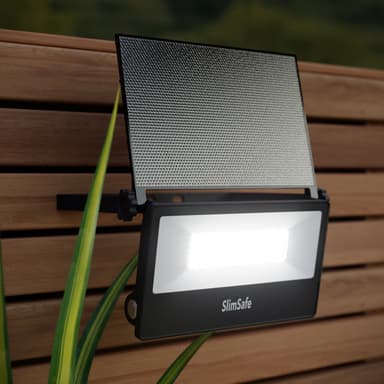
Is this light adjustable from the solar panel to the light.
Asked by Jane Powell on 9 Aug 2023
Hello. I am afraid the solar panel does not come away from the light.
Are the solar panel and light hinged so that they can be angled to a) better catch the sun and b) not dazzle anyone ? Thanks.
Asked by Phil on 9 Aug 2023
Hello Phil, The light and panel are fully adjustable, on a 360 hinge.
What is the angle of detection for the motion sensor light thanks
Asked by Mrs jones on 8 Aug 2023
360 degrees.